Terraform CI/CD: Plan on PR, Apply on Merge
S01E05 of Terraform for Application Engineers
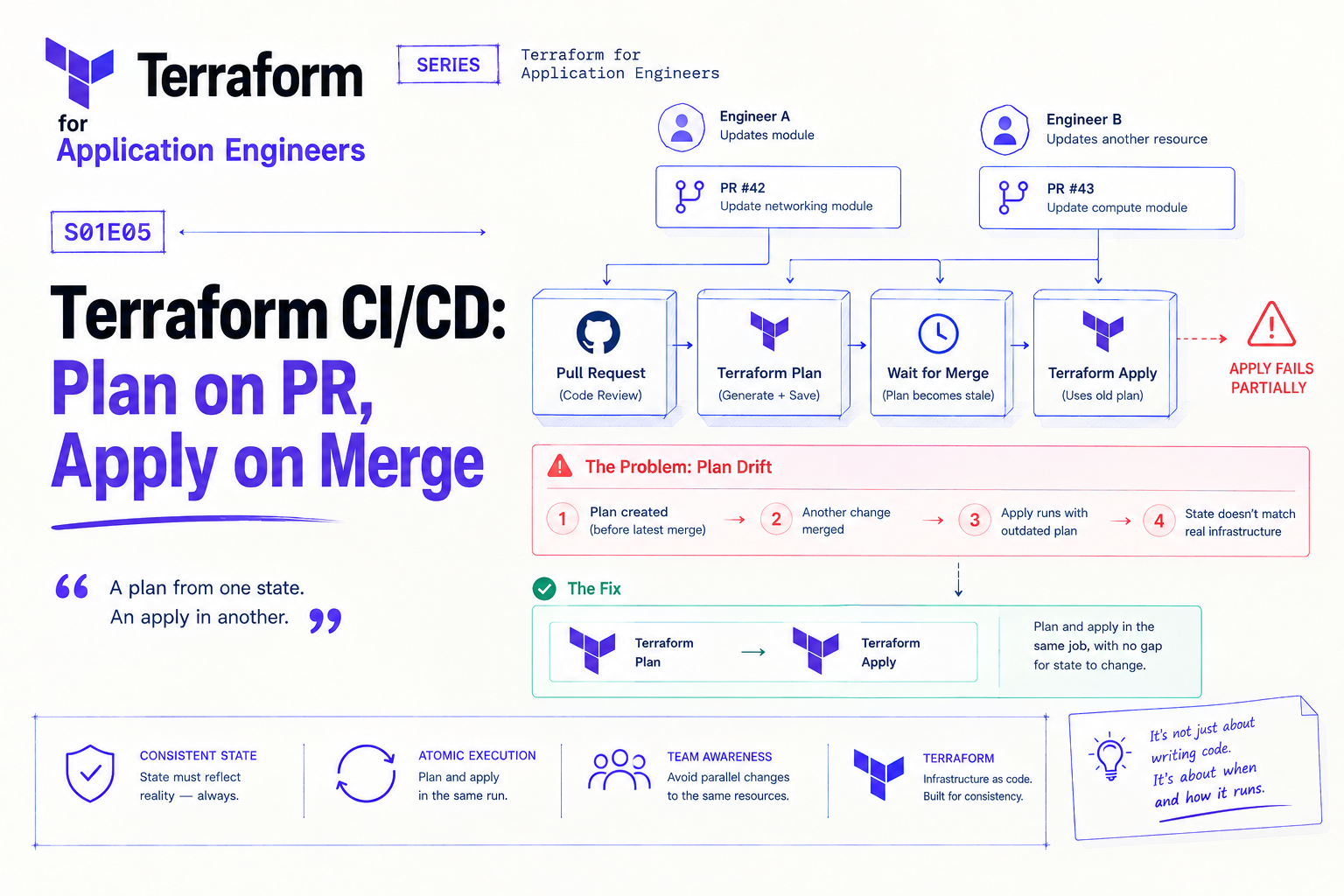
The pipeline ran terraform apply against a saved plan file. What it didn't account for: another engineer had merged a change to the same module forty minutes earlier. The plan was generated before that merge. By the time the pipeline applied it, the plan was already describing a state of the world that no longer existed.
The apply partially succeeded. Some resources were updated correctly. Others conflicted with the changes already applied. The state file ended up describing infrastructure that didn't match what was actually running — the worst possible outcome, because Terraform's ability to manage your infrastructure depends entirely on state accuracy.
The fix is straightforward once you understand it: never apply a plan that was generated in a different pipeline run than the one doing the apply. Plan and apply in the same job, with no gap between them where state can change.
The Core Workflow
The pattern is simple:
On pull request: run
terraform plan, post the output as a PR comment so reviewers see exactly what will changeOn merge to main: run
terraform planagain (fresh), thenterraform applyimmediately in the same job
The second plan on merge is what prevents the stale plan problem. Yes, you run plan twice. That's the correct behaviour — the PR plan is for review, the merge plan is for safety.
# .github/workflows/terraform.yml
name: Terraform

on:
  pull_request:
    paths: ['infra/**']
  push:
    branches: [main]
    paths: ['infra/**']

permissions:
  contents: read
  id-token: write        # Workload Identity Federation
  pull-requests: write   # post plan output as PR comment

jobs:
  terraform:
    runs-on: ubuntu-latest
    defaults:
      run:
        working-directory: infra

    steps:
      - uses: actions/checkout@v4

      - name: Authenticate to GCP
        uses: google-github-actions/auth@v2
        with:
          workload_identity_provider: ${{ secrets.WIF_PROVIDER }}
          service_account: ${{ secrets.TERRAFORM_SA }}

      - uses: hashicorp/setup-terraform@v3
        with:
          terraform_version: "1.9.0"

      - name: Terraform Init
        run: terraform init

      - name: Select Environment
        run: |
          ENV=${{ github.ref == 'refs/heads/main' && 'prod' || 'dev' }}
          echo "TF_VAR_FILE=environments/${ENV}.tfvars" >> $GITHUB_ENV

      - name: Terraform Plan
        id: plan
        run: terraform plan -var-file=${{ env.TF_VAR_FILE }} -no-color
        continue-on-error: true   # don't fail the job on plan errors yet

      - name: Post Plan to PR
        if: github.event_name == 'pull_request'
        uses: actions/github-script@v7
        with:
          script: |
            const output = `#### Terraform Plan
            \`\`\`
            ${{ steps.plan.outputs.stdout }}
            \`\`\`
            *Plan outcome: ${{ steps.plan.outcome }}*`;
            github.rest.issues.createComment({
              issue_number: context.issue.number,
              owner: context.repo.owner,
              repo: context.repo.repo,
              body: output
            });

      - name: Fail on Plan Error
        if: steps.plan.outcome == 'failure'
        run: exit 1

      - name: Terraform Apply
        if: github.ref == 'refs/heads/main' && github.event_name == 'push'
        run: terraform apply -var-file=${{ env.TF_VAR_FILE }} -auto-approve
The continue-on-error: true on the plan step lets the pipeline post the error output as a PR comment before failing — without it, a failed plan kills the job before the comment step runs, and reviewers see nothing useful.
Workload Identity Federation
The workflow above uses Workload Identity Federation instead of a service account key file. This matters: a key file stored in GitHub Secrets is a credential that exists permanently and needs to be rotated. WIF issues short-lived tokens — no long-lived credential, nothing to rotate, nothing to accidentally leak.
Setup is a one-time Terraform config:
# infra/modules/wif/main.tf
resource "google_iam_workload_identity_pool" "github" {
  workload_identity_pool_id = "github-actions"
  display_name              = "GitHub Actions"
}

resource "google_iam_workload_identity_pool_provider" "github" {
  workload_identity_pool_id          = google_iam_workload_identity_pool.github.workload_identity_pool_id
  workload_identity_pool_provider_id = "github-provider"

  attribute_mapping = {
    "google.subject"       = "assertion.sub"
    "attribute.repository" = "assertion.repository"
  }

  oidc {
    issuer_uri = "https://token.actions.githubusercontent.com"
  }
}

resource "google_service_account_iam_member" "github_wif" {
  service_account_id = google_service_account.terraform.name
  role               = "roles/iam.workloadIdentityUser"
  member             = "principalSet://iam.googleapis.com/${google_iam_workload_identity_pool.github.name}/attribute.repository/your-org/your-repo"
}
Once provisioned, the google-github-actions/auth step handles token exchange automatically.
The Terraform Service Account
The service account running terraform apply needs enough permissions to provision whatever you're managing. Avoid roles/owner or roles/editor — they're too broad and create unnecessary blast radius if the credentials are ever misused.
Create a dedicated Terraform service account with the specific roles it needs:
resource "google_service_account" "terraform" {
  account_id   = "terraform-ci"
  display_name = "Terraform CI Service Account"
}

locals {
  terraform_roles = [
    "roles/run.admin",
    "roles/pubsub.admin",
    "roles/cloudsql.admin",
    "roles/secretmanager.admin",
    "roles/iam.serviceAccountAdmin",
    "roles/iam.workloadIdentityPoolAdmin",
    "roles/resourcemanager.projectIamAdmin",
  ]
}

resource "google_project_iam_member" "terraform_roles" {
  for_each = toset(local.terraform_roles)
  project  = var.gcp_project_id
  role     = each.value
  member   = "serviceAccount:${google_service_account.terraform.email}"
}
GitLab CI
The same pattern translates directly to GitLab CI. The main difference is authentication — GitLab uses ID tokens for WIF instead of GitHub's OIDC:
# .gitlab-ci.yml
variables:
  TF_VAR_FILE: "environments/${CI_ENVIRONMENT_NAME}.tfvars"

terraform:plan:
  stage: plan
  script:
    - terraform init
    - terraform plan -var-file=$TF_VAR_FILE -no-color | tee plan.txt
  artifacts:
    reports:
      terraform: plan.txt
  rules:
    - if: $CI_PIPELINE_SOURCE == "merge_request_event"

terraform:apply:
  stage: apply
  script:
    - terraform init
    - terraform plan -var-file=$TF_VAR_FILE   # fresh plan — not the saved artifact
    - terraform apply -var-file=$TF_VAR_FILE -auto-approve
  environment:
    name: production
  rules:
    - if: $CI_COMMIT_BRANCH == $CI_DEFAULT_BRANCH
Note again: the apply job runs a fresh plan, not the saved artifact from the plan job. Same principle as GitHub Actions — the artifact is for review, not for applying.
Branch Protection Rules
The pipeline is only as safe as your branch protection. Without protection on main, an engineer can push directly and trigger an apply without a plan review. Configure at minimum:
Require pull request reviews before merging
Require status checks to pass (the plan job) before merging
Restrict who can push directly to
main
In GitHub this is under Settings → Branches → Branch protection rules. In GitLab it's under Settings → Repository → Protected branches.
The Rule
Plan and apply in the same pipeline run. Never apply a plan that was generated in a different run. Post plan output on PRs so reviewers see infrastructure changes alongside code changes.
The rest is configuration — which service account, which secrets mechanism, which CI platform. The principle doesn't change.
About the author
- Senior full-stack engineer and engineering lead with 5+ years building cloud-native systems at scale. I write about the things the docs don't cover — GCP, FastAPI, Terraform, event-driven architecture, and AI-powered backends. No hello-world demos.
Comments
Join the discussionNo comments yet. Be the first to comment.
Terraform for Application Engineers
Most Terraform content is written for DevOps and platform teams. This series is for application engineers who build the services and should own the infrastructure that runs them. Each post covers one real decision — module design, state management, secrets, CI/CD, GCP provisioning — with the context that only comes from being close to the application code. No ops background required