When Terraform Gets Messy: Refactoring, Imports, and State Surgery
S01E06 of Terraform for Application Engineers
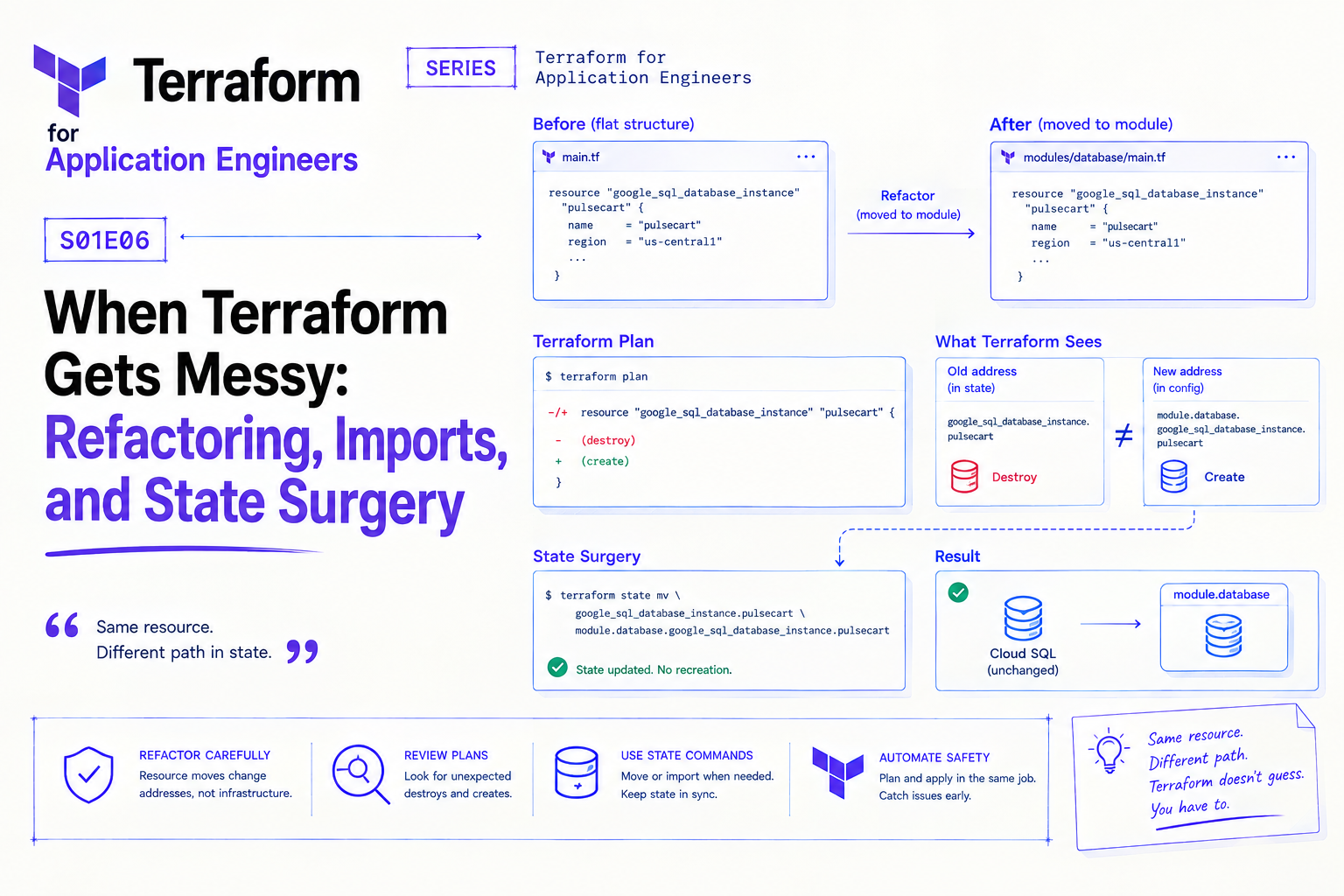
The plan output showed the Cloud SQL instance being destroyed and recreated.
The database hadn't changed. The configuration hadn't changed. Someone had moved the resource from a flat main.tf into a module — a clean refactor, the right thing to do — and Terraform interpreted the change in resource address as a delete-and-recreate.
google_sql_database_instance.pulsecart was becoming module.database.google_sql_database_instance.pulsecart. Same resource. Different path in state. Terraform saw a new resource to create and an old one to destroy. The plan would have wiped the production database.
It was caught in the plan review. Twelve seconds from catastrophe, saved by the CI workflow from S01E05. The fix took ten minutes. The lesson took longer to sink in.
Refactoring Without Destroying: The moved Block
Before Terraform 1.1, renaming or moving a resource in state required terraform state mv — a manual command you had to run locally before the next apply. Miss it and you got a destroy-recreate. Run it at the wrong time and you risked state corruption.
The moved block codifies the rename in HCL:
# When you move a resource into a module
moved {
  from = google_sql_database_instance.pulsecart
  to   = module.database.google_sql_database_instance.pulsecart
}

# When you rename a resource within the same file
moved {
  from = google_cloud_run_v2_service.api
  to   = google_cloud_run_v2_service.producer
}

# When you move a resource between modules
moved {
  from = module.cloud_run.google_cloud_run_v2_service.api
  to   = module.producer.google_cloud_run_v2_service.api
}
Add the moved block alongside the refactor. Run terraform plan — you'll see # module.database.google_sql_database_instance.pulsecart has moved instead of a destroy-recreate. Apply, verify, then remove the moved block in the next PR.
Keep moved blocks until everyone on the team has applied the change. Remove them too early and anyone who hasn't applied yet will see the destroy-recreate you were trying to prevent.
Importing Existing Resources
Not everything starts with Terraform. Cloud resources created manually, created by a different tool, or created before your team adopted IaC need to be imported into state before Terraform can manage them.
The modern approach is the import block (Terraform 1.5+):
# Write the HCL config for the resource first
resource "google_pubsub_topic" "legacy_events" {
  name = "pulsecart-legacy-events"
}

# Then declare the import alongside it
import {
  to = google_pubsub_topic.legacy_events
  id = "projects/your-project/topics/pulsecart-legacy-events"
}
Run terraform plan — Terraform shows what it would import and whether the config matches the real resource. Run terraform apply — the resource is in state. Remove the import block. Done.
The resource ID format varies by resource type. For GCP resources, terraform import documentation lists the expected ID format. For Cloud Run: projects/{project}/locations/{location}/services/{service}. For Cloud SQL: projects/{project}/instances/{instance}.
For bulk imports — recovering from the lost-state scenario from S01E03 — the import block scales:
import {
  to = google_cloud_run_v2_service.producer
  id = "projects/pulsecart-prod/locations/us-central1/services/pulsecart-producer"
}

import {
  to = google_cloud_run_v2_service.consumer
  id = "projects/pulsecart-prod/locations/us-central1/services/pulsecart-consumer"
}

import {
  to = google_pubsub_topic.commerce_events
  id = "projects/pulsecart-prod/topics/pulsecart-commerce-events"
}
All in one plan, one apply, one PR. Beats running terraform import manually for each resource.
State Surgery: When to Use terraform state
moved blocks handle planned refactors. import blocks handle bringing external resources under management. For everything else — fixing state that's gotten out of sync — you use terraform state commands.
terraform state list — see what Terraform knows about:
terraform state list
# module.database.google_sql_database_instance.pulsecart
# module.cloud_run.google_cloud_run_v2_service.producer
# google_pubsub_topic.commerce_events
terraform state show — inspect a specific resource's stored attributes:
terraform state show module.database.google_sql_database_instance.pulsecart
terraform state mv — move a resource in state without touching the real resource. Use this when moved blocks aren't available (Terraform < 1.1) or for emergency fixes:
terraform state mv \
  google_sql_database_instance.pulsecart \
  module.database.google_sql_database_instance.pulsecart
terraform state rm — remove a resource from state without destroying it. Use when you want Terraform to stop managing something without deleting it:
terraform state rm google_pubsub_topic.legacy_events
After state rm, the resource still exists in GCP — Terraform just no longer knows about it. Use this before deleting a resource from your HCL if you don't want Terraform to destroy it on the next apply.
The lifecycle Block
Some resources shouldn't be destroyed under any circumstances. Some should be replaced before the old one is removed. Some have attributes that change outside Terraform and shouldn't trigger a plan diff.
resource "google_sql_database_instance" "pulsecart" {
  name = "pulsecart-prod-postgres"

  lifecycle {
    prevent_destroy = true   # terraform destroy or accidental removal throws an error

    ignore_changes = [
      settings[0].disk_size,   # Cloud SQL auto-grows disk — ignore drift
    ]

    create_before_destroy = true   # create the replacement before destroying the old one
  }
}
prevent_destroy is a safety net for resources that should never be deleted via Terraform — production databases, buckets with data, anything where an accidental destroy would be catastrophic. It doesn't prevent manual deletion from the console, but it stops terraform destroy and accidental HCL removal.
ignore_changes silences plan noise for attributes that change outside Terraform legitimately — Cloud SQL auto-grows disk, Cloud Run updates its revision URL on each deploy. Without ignore_changes, Terraform shows these as drift on every plan.
create_before_destroy is important for resources where downtime during replacement is unacceptable. By default Terraform destroys first, then creates. This flag reverses the order.
The Pattern That Prevents Most of This
The situations covered in this post — accidental destroy-recreates, manual state surgery, lifecycle edge cases — all become rarer when the rest of the series is in place:
Remote state with versioning (S01E03) — you can restore from bad state
Plan on PR with review (S01E05) — destroy-recreates get caught before apply
Module structure from day one (S01E02) — fewer refactors needed later
State surgery is a skill worth having. Needing it frequently is a signal something earlier in the process needs fixing.
That's the series. Six posts from "why application engineers should own this" to "what to do when it breaks." The infrastructure layer isn't someone else's problem — it's the foundation everything else runs on, and the engineers who understand it build more reliable systems.
About the author
- Senior full-stack engineer and engineering lead with 5+ years building cloud-native systems at scale. I write about the things the docs don't cover — GCP, FastAPI, Terraform, event-driven architecture, and AI-powered backends. No hello-world demos.
Comments
Join the discussionNo comments yet. Be the first to comment.
Terraform for Application Engineers
Most Terraform content is written for DevOps and platform teams. This series is for application engineers who build the services and should own the infrastructure that runs them. Each post covers one real decision — module design, state management, secrets, CI/CD, GCP provisioning — with the context that only comes from being close to the application code. No ops background required