Async AI Pipelines in FastAPI: Streaming, Queuing, and Long-Running Requests
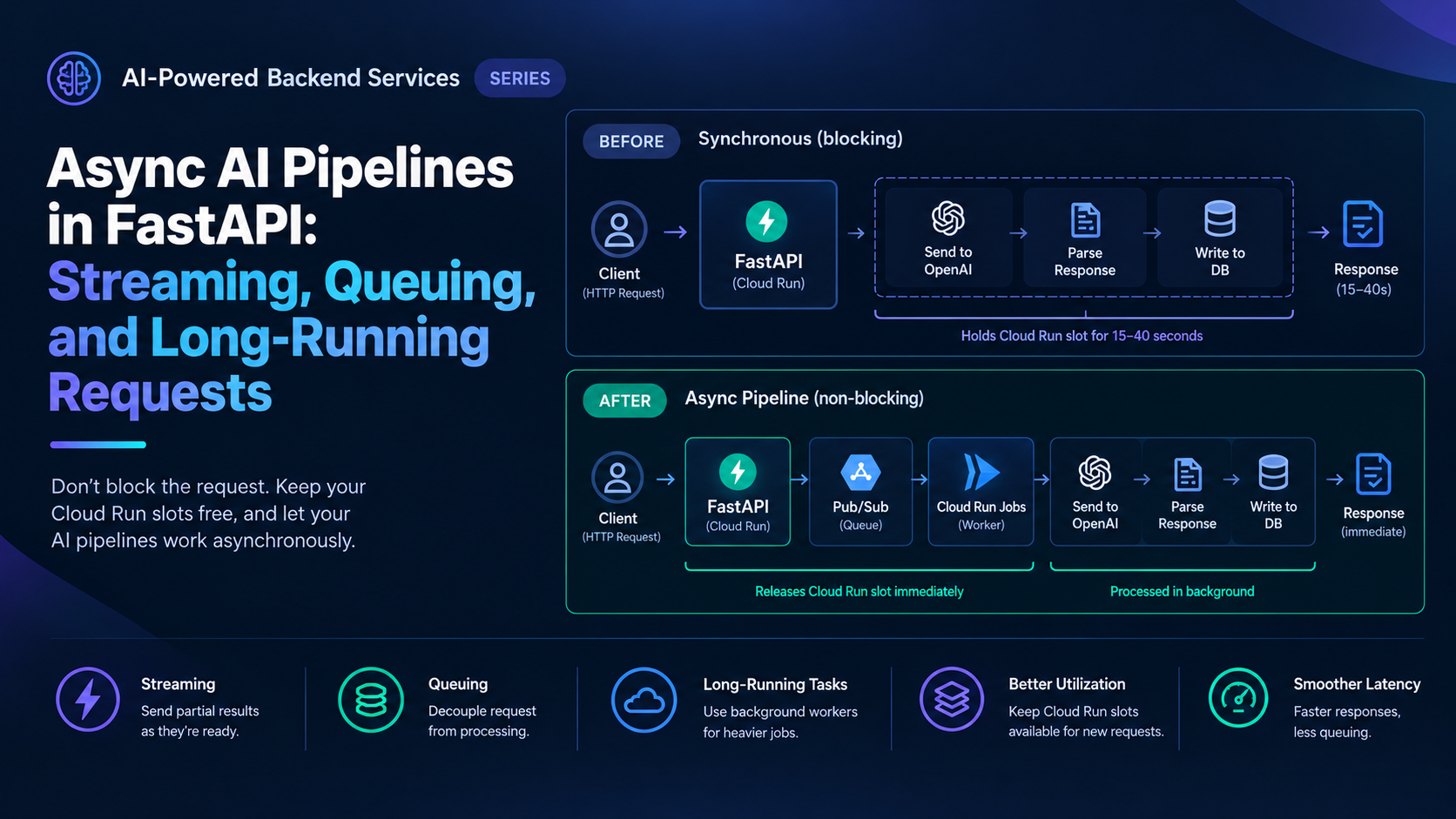
The document extraction endpoint was synchronous. A request came in, the service sent the document to OpenAI, waited for the full response, parsed it, wrote to the database, and returned.
Each request held a Cloud Run concurrency slot for between 15 and 40 seconds depending on document length. Cloud Run's default concurrency is 80 requests per instance. In practice, with 40-second average response times, each slot was occupied for most of a minute. At 10 concurrent users, 10 slots were gone. New requests queued behind them. Latency compounded. The service looked degraded even though nothing was broken — it was just waiting.
The fix isn't more Cloud Run instances. It's not blocking the slot in the first place.
Why Sync LLM Calls Break at Scale
The math is straightforward. If each LLM call takes 20 seconds and your Cloud Run instance handles 80 concurrent requests, your effective throughput per instance is 80 / 20 = 4 requests per second. Add more instances and you scale linearly — but you're paying for all of them, and cold starts add latency on the way up.
More importantly, users waiting 20–40 seconds for a response is a poor experience regardless of throughput. The three patterns below fix both problems — throughput and perceived latency — in different ways depending on what the request needs.
Pattern 1: Server-Sent Events Streaming
For generation tasks where the user is waiting and wants to see output appear progressively, streaming is the right fix. Instead of waiting for the complete response, return tokens as they arrive.
# routers/generation.py
from fastapi import APIRouter
from fastapi.responses import StreamingResponse
from openai import AsyncOpenAI
import asyncio

router = APIRouter()
client = AsyncOpenAI()

async def stream_tokens(prompt: str, system: str):
    async with client.chat.completions.stream(
        model="gpt-4o-mini",
        messages=[
            {"role": "system", "content": system},
            {"role": "user", "content": prompt},
        ],
        max_tokens=1000,
    ) as stream:
        async for text in stream.text_stream:
            yield f"data: {text}\n\n"
    yield "data: [DONE]\n\n"

@router.post("/generate/stream")
async def generate_stream(request: GenerationRequest):
    return StreamingResponse(
        stream_tokens(request.prompt, request.system),
        media_type="text/event-stream",
        headers={
            "Cache-Control": "no-cache",
            "X-Accel-Buffering": "no",   # disable nginx buffering if behind a proxy
        }
    )
The slot is still held for the duration of the stream — but the user sees output immediately, and the perceived latency drops from "wait 30 seconds for anything" to "first token in under a second." For interactive generation (chat, content drafting, code generation), this is the right pattern.
X-Accel-Buffering: no prevents nginx or Cloud Run's load balancer from buffering the SSE stream before sending it to the client. Without it, tokens batch up and the streaming effect disappears.
Use when: the user is waiting and wants progressive output. Not useful for background processing.
Pattern 2: Pub/Sub Offload for Fire-and-Forget
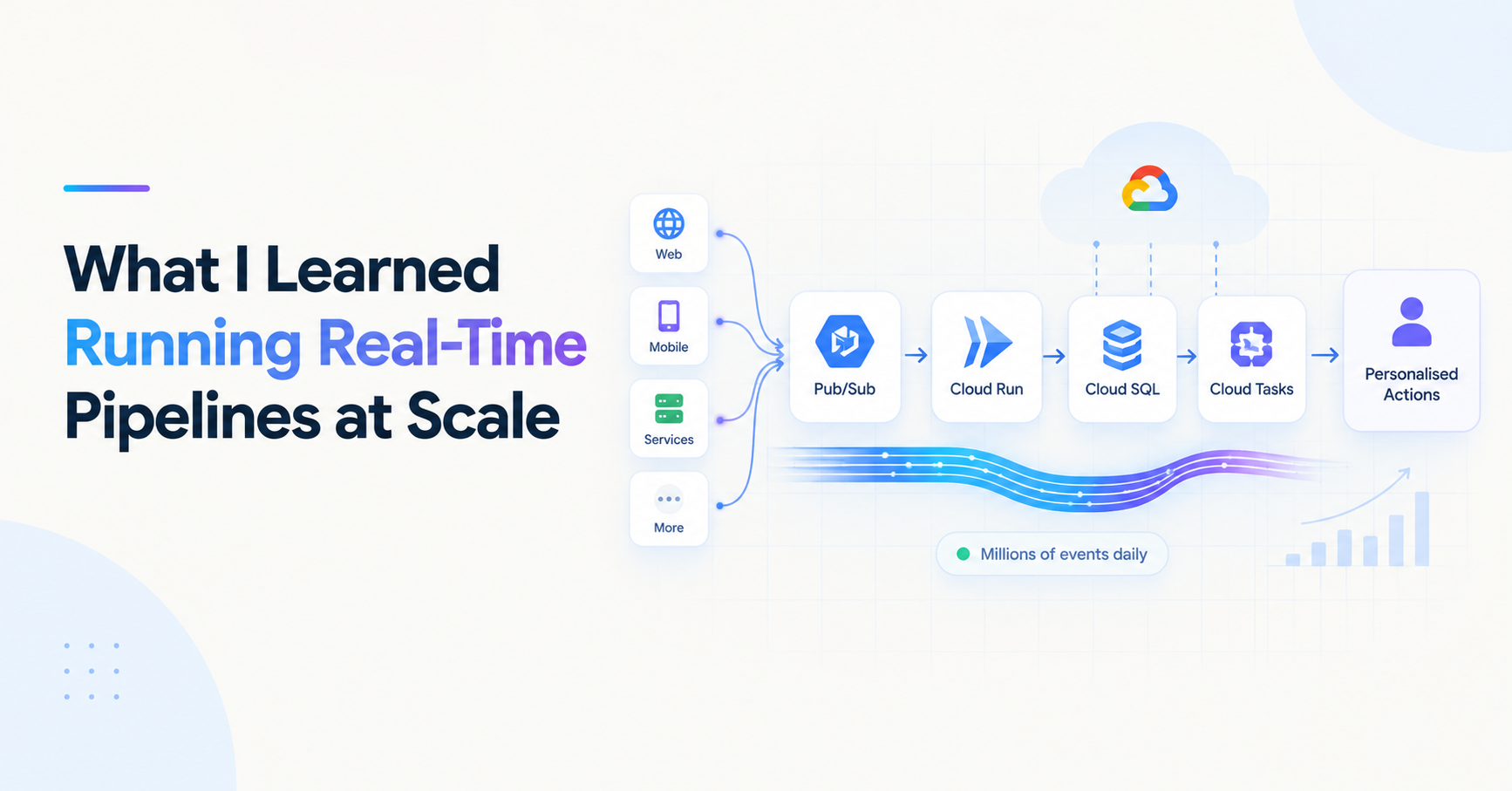
For work that doesn't need a real-time response — sending an AI-generated email, processing an uploaded document, enriching a record — don't make the user wait at all. Accept the request, publish an event, return a job ID.
# routers/documents.py
from fastapi import APIRouter, status
from services.publisher import publish_event
import uuid

router = APIRouter()

@router.post("/documents/extract", status_code=status.HTTP_202_ACCEPTED)
async def queue_extraction(request: ExtractionRequest):
    job_id = f"job_{uuid.uuid4().hex[:12]}"

    await publish_event({
        "event_type": "document.extraction_requested",
        "job_id": job_id,
        "document_id": request.document_id,
        "user_id": request.user_id,
        "payload": {"document_url": request.document_url},
    })

    return {"job_id": job_id, "status": "queued"}
A Cloud Run consumer picks up the event from Pub/Sub, calls the model, writes results to the database, and updates the job status. The client polls /jobs/{job_id} or receives a webhook when complete.
# routers/jobs.py
@router.get("/jobs/{job_id}")
async def get_job_status(job_id: str, db: AsyncSession = Depends(get_db)):
    job = await db.execute(
        select(Job).where(Job.id == job_id)
    )
    job = job.scalar_one_or_none()
    if not job:
        raise HTTPException(status_code=404, detail="Job not found")
    return {"job_id": job_id, "status": job.status, "result": job.result}
The original request returns in milliseconds. The slot is freed immediately. The heavy work happens asynchronously in a consumer that can scale independently.
Use when: the user doesn't need to watch output appear in real time, and the work can complete within Pub/Sub's message retention window.
Pattern 3: Cloud Tasks for Long-Running Jobs
Some AI jobs are too long for Pub/Sub's acknowledgement deadline — multi-document analysis, large batch processing, jobs that chain multiple model calls. Cloud Tasks gives you explicit scheduling, per-task retry control, and no ack deadline pressure.
# services/tasks.py
from google.cloud import tasks_v2
from config import settings
import json

tasks_client = tasks_v2.CloudTasksClient()
QUEUE_PATH = tasks_client.queue_path(
    settings.gcp_project_id,
    settings.gcp_region,
    "ai-processing-queue"
)

async def schedule_ai_job(job_id: str, payload: dict) -> str:
    task = {
        "http_request": {
            "http_method": tasks_v2.HttpMethod.POST,
            "url": f"{settings.worker_url}/worker/process",
            "headers": {"Content-Type": "application/json"},
            "body": json.dumps({
                "job_id": job_id,
                **payload
            }).encode(),
            "oidc_token": {
                "service_account_email": settings.service_account_email
            }
        },
        "name": f"{QUEUE_PATH}/tasks/{job_id}",   # deterministic — free dedup
    }
    response = tasks_client.create_task(
        request={"parent": QUEUE_PATH, "task": task}
    )
    return response.name
The worker endpoint on a separate Cloud Run service (or the same one with a /worker prefix) handles the heavy processing:
# routers/worker.py
@router.post("/worker/process", status_code=status.HTTP_204_NO_CONTENT)
async def process_job(payload: dict, db: AsyncSession = Depends(get_db)):
    job_id = payload["job_id"]

    await update_job_status(db, job_id, "processing")

    try:
        # Multi-step AI pipeline — can take minutes
        result = await run_extraction_pipeline(payload)
        await update_job_status(db, job_id, "complete", result=result)
    except Exception as e:
        await update_job_status(db, job_id, "failed", error=str(e))
        raise   # Cloud Tasks retries on non-2xx
Use when: jobs take longer than Pub/Sub's ack deadline, need explicit retry configuration, or involve chained model calls that could run for minutes.
How to Choose
| Concern | SSE Streaming | Pub/Sub Offload | Cloud Tasks |
|---|---|---|---|
| User waits for output | ✅ | ❌ | ❌ |
| Job duration | Seconds | < 10 minutes | Minutes+ |
| Retry control | None | Subscription-level | Per-task |
| Deduplication | N/A | Manual (Redis) | Built-in (task name) |
| Slot held | Yes | No | No |
The rule: if the user is watching, stream. If the work is quick and fire-and-forget, use Pub/Sub. If the work is long or needs explicit retry control, use Cloud Tasks.
About the author
- Senior full-stack engineer and engineering lead with 5+ years building cloud-native systems at scale. I write about the things the docs don't cover — GCP, FastAPI, Terraform, event-driven architecture, and AI-powered backends. No hello-world demos.
Comments
Join the discussionNo comments yet. Be the first to comment.
AI-Powered Backend Services
LLM APIs don't fail the way REST APIs do. A 200 response with a well-formed body can still contain output you can't use, costs you didn't expect, or behaviour that changed silently after a model update. This series covers building AI-powered backend services that hold up in production — prompt management, output validation, async pipelines, cost control, testing non-deterministic code, and deployment patterns for variable-latency workloads. Written from real experience integrating OpenAI and Gemini into production FastAPI services on GCP.