PostgreSQL Connection Pooling on Cloud Run: The Problem Nobody Warns You About
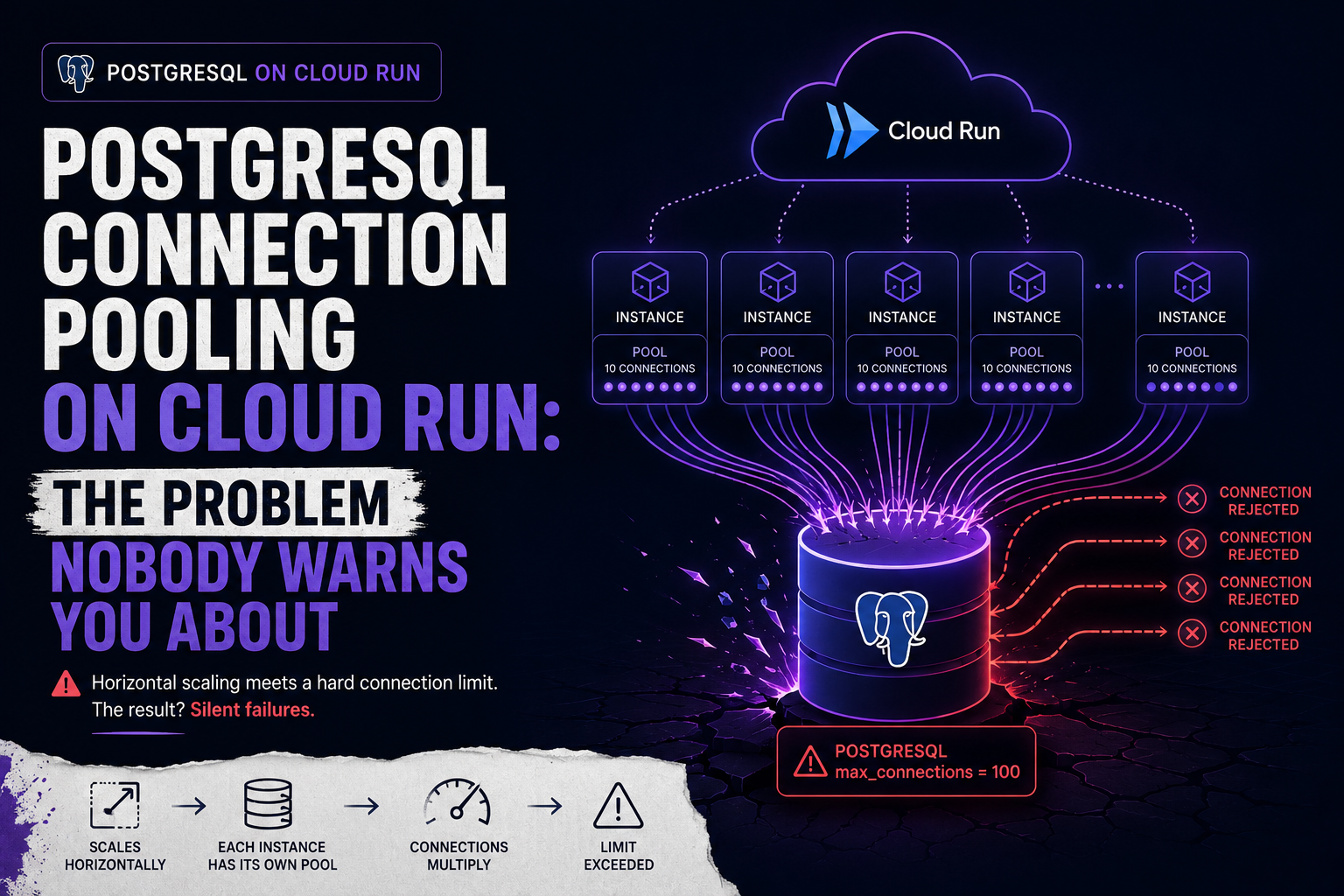
Cloud Run scales horizontally. That's the point. Under load, it spins up new instances automatically — each one handling concurrent requests, each one maintaining its own connection pool to your Cloud SQL PostgreSQL instance.
Here's what that looks like in numbers.
You configure your SQLAlchemy pool with pool_size=5 and max_overflow=5 — ten connections per instance. Sounds reasonable. At 10 Cloud Run instances under moderate load, that's 100 connections. At 50 instances during a traffic spike, that's 500. PostgreSQL's default max_connections is 100. At 20 instances you've already exceeded it. New connections get rejected. Requests fail.
This isn't a Cloud Run bug. It's the expected behaviour of two systems — one that scales horizontally without limit, one that has a hard connection ceiling — combined without accounting for the interaction.
Why It's Worse Than It Looks
The math above assumes every instance is using its full pool. In practice it's more unpredictable. Cloud Run instances don't scale down immediately. Idle instances sit around holding open connections they're not using. Your effective connection count at any given moment is max_connections_per_instance × live_instances — and live instances includes the idle ones.
Cloud SQL's connection limits vary by machine tier. A db-g1-small (the default for dev environments that get accidentally promoted to prod) caps at around 25 connections. A db-custom-4-15360 caps at around 4,000. If you're not sure what tier your instance is, you're probably not sure what your connection ceiling is.
-- Check your current connection usage and limit
SELECT
  count(*) as active_connections,
  max_conn as connection_limit
FROM pg_stat_activity, (SELECT setting::int AS max_conn FROM pg_settings WHERE name = 'max_connections') AS limits
GROUP BY max_conn;
Run this during a load test. The number is usually higher than expected.
The Fix: Pool Sizing That Accounts for Horizontal Scale
The formula isn't pool_size = how_many_feels_right. It's:
max_pool_size_per_instance = floor(db_max_connections / max_cloud_run_instances)
Leave headroom for Cloud SQL's internal processes (~3 connections) and for admin access during incidents. A practical formula:
usable_connections = db_max_connections - 5
max_pool_per_instance = floor(usable_connections / max_cloud_run_instances)
For a db-custom-2-7680 with 500 max connections and 20 max Cloud Run instances:
usable_connections = 495
max_pool_per_instance = floor(495 / 20) = 24
Set pool_size below that ceiling with headroom for overflow:
# config.py
from pydantic_settings import BaseSettings

class Settings(BaseSettings):
    database_url: str
    db_pool_size: int = 5
    db_max_overflow: int = 10
    db_pool_timeout: int = 30
    db_pool_recycle: int = 1800   # recycle connections every 30 minutes

settings = Settings()
# db/pool.py
from sqlalchemy.ext.asyncio import create_async_engine, AsyncSession, async_sessionmaker
from config import settings

engine = create_async_engine(
    settings.database_url,
    pool_size=settings.db_pool_size,
    max_overflow=settings.db_max_overflow,
    pool_timeout=settings.db_pool_timeout,
    pool_recycle=settings.db_pool_recycle,
    pool_pre_ping=True,   # verify connections before using them
)

AsyncSessionLocal = async_sessionmaker(
    engine,
    class_=AsyncSession,
    expire_on_commit=False,
)
# dependencies.py
from db.pool import AsyncSessionLocal
from typing import AsyncGenerator
from sqlalchemy.ext.asyncio import AsyncSession

async def get_db() -> AsyncGenerator[AsyncSession, None]:
    async with AsyncSessionLocal() as session:
        yield session
pool_pre_ping=True adds a lightweight SELECT 1 before each connection is used. It catches stale connections that Cloud SQL dropped on its end — without it, a connection that's been idle for Cloud SQL's timeout period returns an error on the first query instead of reconnecting cleanly.
pool_recycle=1800 proactively replaces connections older than 30 minutes. Cloud SQL drops idle connections after a configurable timeout (default 10 minutes). Recycling before that point prevents the errors that pool_pre_ping catches — it's the belt to pre_ping's suspenders.
The Better Fix: PgBouncer
Pool sizing helps. It doesn't solve the fundamental problem — Cloud Run's horizontal scaling means your connection count grows with your instance count, and at high scale, even a small pool per instance adds up.
PgBouncer sits between your application and Cloud SQL and maintains a fixed pool of server-side connections regardless of how many application instances connect to it. A hundred Cloud Run instances can each open 10 connections to PgBouncer; PgBouncer maintains 50 actual connections to PostgreSQL.
On GCP, the cleanest way to run PgBouncer is as a Cloud Run sidecar or a dedicated Cloud Run service:
# cloud-run-service.yaml (simplified)
apiVersion: serving.knative.dev/v1
kind: Service
metadata:
  name: pulsecart-api
spec:
  template:
    spec:
      containers:
        - image: gcr.io/your-project/pulsecart-api
          env:
            - name: DATABASE_URL
              value: postgresql+asyncpg://user:pass@localhost:5432/pulsecart
        - image: edoburu/pgbouncer
          env:
            - name: DATABASE_URL
              value: postgresql://user:pass@/cloudsql/your-project:region:instance/pulsecart
            - name: POOL_MODE
              value: transaction
            - name: MAX_CLIENT_CONN
              value: "1000"
            - name: DEFAULT_POOL_SIZE
              value: "50"
POOL_MODE=transaction is the right mode for stateless APIs — PgBouncer assigns a server connection for the duration of a transaction only, not the entire client session. This gives the highest multiplexing efficiency for request-per-transaction workloads like FastAPI.
The tradeoff: transaction mode doesn't support session-level features like SET LOCAL, advisory locks, or LISTEN/NOTIFY. If you use any of these, use session mode instead and accept lower multiplexing efficiency.
Cloud SQL Auth Proxy
If you're connecting to Cloud SQL via the Auth Proxy (which you should be — it handles IAM auth and TLS termination), the proxy itself doesn't pool connections. It's a pass-through. All the pooling logic above still applies; the proxy just sits between your application and Cloud SQL handling the authentication layer.
Run the Auth Proxy as a sidecar alongside your application container, not as a separate service — the connection overhead between containers on the same Cloud Run instance is negligible, and it avoids the network hop of a separate service.
The Monitoring You Need
Set this up before you need it:
# Add to your /health endpoint
from sqlalchemy import text

@app.get("/health")
async def health(db: AsyncSession = Depends(get_db)):
    try:
        result = await db.execute(text(
            "SELECT count(*) FROM pg_stat_activity WHERE datname = current_database()"
        ))
        active_connections = result.scalar()
        return {"status": "ok", "db_connections": active_connections}
    except Exception:
        return JSONResponse(status_code=503, content={"status": "degraded"})
Expose connection count in your health endpoint. Set a Cloud Monitoring alert when it approaches 80% of your max_connections. At 80% you have time to react. At 100% you're already dropping requests.
Summary
Cloud Run + PostgreSQL without connection management is a scaling time bomb. The failure doesn't happen at low traffic — it happens exactly when you can least afford it.
Size your pool to account for horizontal scaling. Add pool_pre_ping and pool_recycle. Monitor connection count as a first-class metric. Add PgBouncer when the math stops working in your favour.
The problem is predictable. The fix is straightforward. The only reason it surprises teams is that nobody mentions it until production is on fire.
About the author
- Senior full-stack engineer and engineering lead with 5+ years building cloud-native systems at scale. I write about the things the docs don't cover — GCP, FastAPI, Terraform, event-driven architecture, and AI-powered backends. No hello-world demos.
Comments
Join the discussionNo comments yet. Be the first to comment.